

Airflow
Apache Airflow sits at the core of the orchestration platform. It is an open-source tool used to author, schedule and monitor complex data workflows using Directed Acyclic Graphs (DAGs).
Why the IMP qualifies as a DAG
A DAG is a graph with no loops or closed circuits: work flows forward and never returns to a node it has already visited.
The DARe IMP is structured in such a way that it contains no loops or closed circuits, and therefore conforms to the definition of a DAG. That is what makes Airflow the right tool rather than a convenient one.
Processing nodes
An Airflow DAG is built using processing nodes, defined using a Python script.
Nodes are linked to one another in sequence to form a graph, with each node performing a single operation:
- Importing data
- Exporting data
- Executing a model to run on the system
Flexibility
Processing nodes are highly flexible, being able to call upon custom user scripts which execute on the host system. This is advantageous when it comes to wide model variety.
The handbook's worked example: MATSim, a Java application, can be run directly on the host system from a processing node with access to the Java Virtual Machine.
Flexibility has a cost, which Docker addresses
Running models directly on the host works, but it makes the host a shared environment whose state every model depends on.
This is precisely why the platform nonetheless encourages containerisation. See Docker.
A DAG in practice
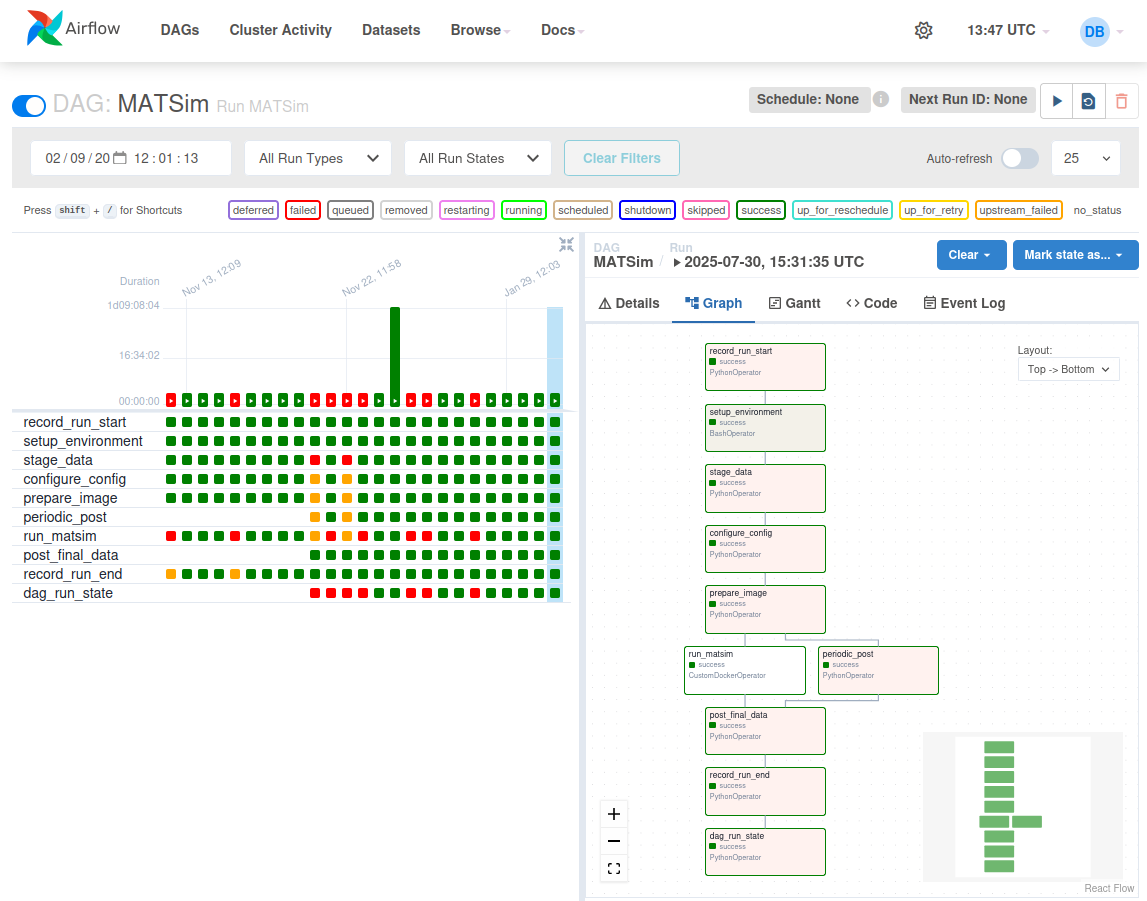
Figure 4. MATSim DAG within the Airflow user interface. Left: DAG run and state history. Right: processing node graph.
The interface shows both halves of what Airflow provides: monitoring on the left, as a history of runs and their states, and authoring structure on the right, as the node graph.
The MATSim DAG's nodes
The graph in Figure 4 gives a concrete example of the single-operation principle:
| Node | Operator | Role |
|---|---|---|
record_run_start | PythonOperator | Register the run |
setup_environment | BashOperator | Prepare the host environment |
stage_data | PythonOperator | Fetch inputs from storage |
configure_config | PythonOperator | Build the MATSim configuration |
prepare_image | PythonOperator | Import and extract the model container |
run_matsim | CustomDockerOperator | Execute the model |
periodic_post | PythonOperator | Post intermediate results while the run proceeds |
post_final_data | PythonOperator | Upload outputs to storage |
record_run_end | PythonOperator | Register completion |
dag_run_state | PythonOperator | Record the final DAG state |
Note the operator on run_matsim
It is a CustomDockerOperator, while its neighbours are ordinary Python or Bash
operators.
That single line is the containerisation strategy in action: the model itself runs in a container, while the data movement and bookkeeping around it run on the host.
Note also that run_matsim and periodic_post run in parallel, rejoining at
post_final_data. A long MATSim run can therefore be monitored as it proceeds rather
than only at the end.
Running a DAG
Once a DAG has been constructed, it can be run to perform all processing node operations within its graph. A set of configuration options must be defined, which set data input and model parameters.
DAG stacking
With Airflow it is possible to arrange DAGs into a stack, allowing a series of DAGs, each containing a model, to execute in sequence.
The problem stacking solves
Running models standalone, a user would usually have to individually modify input criteria for each model.
Stacking DAGs allows configuration and parameters to be set once by the user, and then dynamically passed from one DAG instance to the next.
This is what turns the IMP from a sequence of models a person runs into a single workflow the platform runs. It is also where the risk of transcription error between models disappears.